Screen Recorder – Lightweight and Portable
🎉Ultra‑Light, Portable, No Installation Required
A powerful yet lightweight screen recording tool designed for professionals,
creators, teachers, and developers who want a simple, fast, and reliable recorder — without subscriptions, bloat, or ads.🚀 Key Features
- ✔ One‑Click Portable EXE – No installation. Simply download and run.
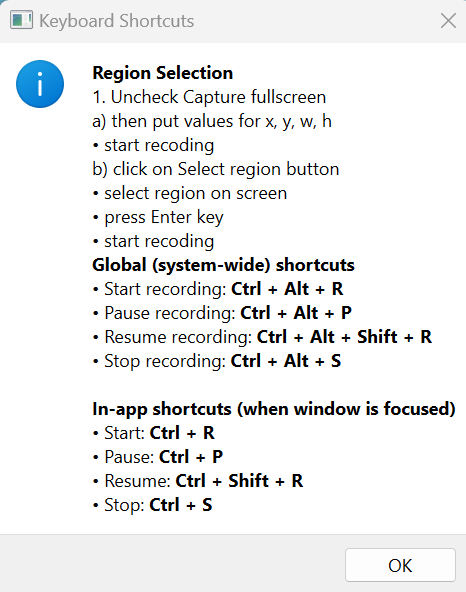
- ✔ Global Hotkeys – Start, pause, resume, or stop recording even when the app window is hidden.
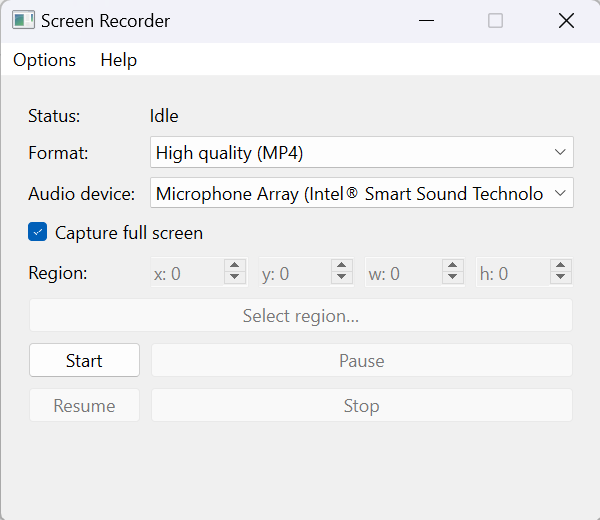
- ✔ Multiple Output Formats – MP4, MKV, WEBM, AVI
- ✔ Full Screen or Region Mode
- ✔ Crystal‑Clear Video Recording
- ✔ Records Audio (Microphone / System — depending on OS)
- ✔ Zero Watermark
- ✔ Zero Ads
- ✔ Zero Subscription—one‑time purchase
- ✔ Toast notification when recording saves
- ✔ Runs on any Windows PC (Windows 10 and later)
- ✔ Extremely low CPU usage
💼 Who Is This For?
- Developers recording demos
- QA testers capturing bugs
- Teachers recording lessons
- Students making presentations
- YouTubers creating tutorials
- Corporate professionals sharing workflows
If you need simple, stable, no-nonsense screen recording, this is for you.
�️ System Requirements
- Windows 10 / 11
- 64‑bit system
- No admin rights required
- No additional downloads needed
📦 What’s Included
Inside the ZIP you will receive:
- ScreenRecorder.exe
- ffmpeg.exe
- LICENSE.txt
- NOTICE.txt
- README.txt
Just extract → double‑click → record.
🔑 License
One-time purchase
Lifetime usage
Commercial use allowed (no redistribution)
💬 Support
Have a question or need help?
Email: roytuts2014@gmail.com
Download
Please follow the download link.
Demo
Here is a small demo how to record:

UI Interface Images
Main Screen:
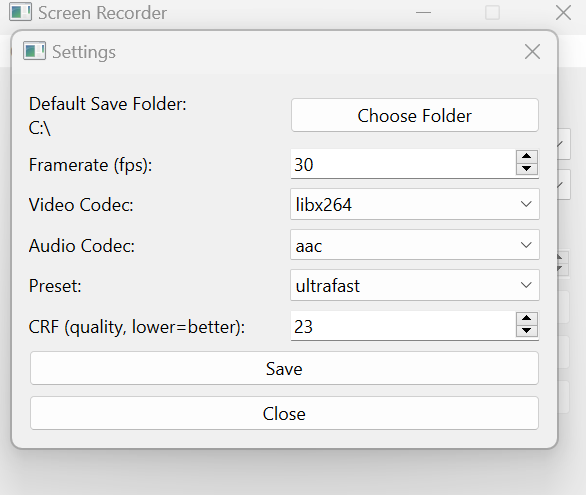
Settings Screen:
Keyboard Shortcuts:
That’s all.