JSF 2, Spring 4, Hibernate 4 and Maven Integration
In this tutorial I will show you how to integrate JSF 2,
Spring 4, Hibernate 4 and Maven. In the previous example Spring 3, JSF 2 and Hibernate 3 integration example , I have shown how to integrate JSF 2, Spring 3 and Hibernate 3 but I have not used maven there.For this tutorial we will create maven based web project in Eclipse.
If you already have an idea on how to create a maven project in Eclipse will be great otherwise I will tell you here how to create a maven project in Eclipse.
Prerequisites
The following configurations are required in order to run the application
Eclipse Kepler
JDK 1.8
Tomcat 8
Have maven installed and configured
JSF 2, Spring 4, Hibernate 4 dependencies in pom.xml
Now we will see the below steps how to create a maven based project in Eclipse
Step 1. Create a maven based web project in Eclipse
Go to File -> New -> Other. On popup window under Maven select Maven Project. Then click on Next. Select the workspace location – either default or browse the location. Click on Next. Now in next window select the row as highlighted from the below list of archtypes and click on Next button.
maven-arctype-webapp
Now enter the required fields (Group Id, Artifact Id) as shown below
Group Id : com.roytuts
Artifact Id : jsf-spring-hibernate
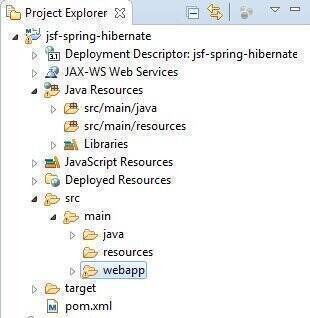
The created project looks like below
<project xmlns="http://maven.apache.org/POM/4.0.0" xmlns:xsi="http://www.w3.org/2001/XMLSchema-instance"
	xsi:schemaLocation="http://maven.apache.org/POM/4.0.0 http://maven.apache.org/maven-v4_0_0.xsd">
	<modelVersion>4.0.0</modelVersion>
	<groupId>com.roytuts</groupId>
	<artifactId>jsf-spring-hibernate</artifactId>
	<packaging>war</packaging>
	<version>0.0.1-SNAPSHOT</version>
	<name>jsf-spring-hibernate Maven Webapp</name>
	<url>http://maven.apache.org</url>
	<properties>
		<java.version>1.8</java.version>
		<spring.version>4.1.6.RELEASE</spring.version>
		<jsf2.version>2.2.10</jsf2.version>
		<hibernate.version>4.3.8.Final</hibernate.version>
		<mysqlconnector.version>5.1.34</mysqlconnector.version>
	</properties>
	<dependencies>
		<!-- Spring and Transactions -->
		<dependency>
			<groupId>org.springframework</groupId>
			<artifactId>spring-core</artifactId>
			<version>${spring.version}</version>
		</dependency>
		<dependency>
			<groupId>org.springframework</groupId>
			<artifactId>spring-webmvc</artifactId>
			<version>${spring.version}</version>
		</dependency>
		<!-- Spring ORM support -->
		<dependency>
			<groupId>org.springframework</groupId>
			<artifactId>spring-orm</artifactId>
			<version>${spring.version}</version>
		</dependency>
		<!-- JSF Dependencies -->
		<dependency>
			<groupId>com.sun.faces</groupId>
			<artifactId>jsf-api</artifactId>
			<version>${jsf2.version}</version>
		</dependency>
		<dependency>
			<groupId>com.sun.faces</groupId>
			<artifactId>jsf-impl</artifactId>
			<version>${jsf2.version}</version>
		</dependency>
		<!-- hibernate 4 -->
		<dependency>
			<groupId>org.hibernate</groupId>
			<artifactId>hibernate-core</artifactId>
			<version>${hibernate.version}</version>
		</dependency>
		<!-- database pool -->
		<dependency>
			<groupId>org.apache.commons</groupId>
			<artifactId>commons-dbcp2</artifactId>
			<version>2.0</version>
		</dependency>
		<!-- mysql java connector -->
		<dependency>
			<groupId>mysql</groupId>
			<artifactId>mysql-connector-java</artifactId>
			<version>${mysqlconnector.version}</version>
		</dependency>
	</dependencies>
	<build>
		<finalName>jsf-spring-hibernate</finalName>
		<plugins>
			<plugin>
				<groupId>org.apache.maven.plugins</groupId>
				<artifactId>maven-compiler-plugin</artifactId>
				<configuration>
					<source>${java.version}</source>
					<target>${java.version}</target>
				</configuration>
			</plugin>
		</plugins>
	</build>
</project>
Step 3. If you see JRE System Library[J2SE-1.5] then change the version by below process
Do right-click on the project and go to Build -> Configure build path, under Libraries tab click on JRE System Library[J2SE-1.5], click on Edit button and select the appropriate jdk 1.8 from the next window. Click on Finish then Ok.
Change also the Compiler compliance level as 1.8 from Java -> Compiler.
Step 4. Now when the build process finished then modify the web.xml file with below source code
<?xml version="1.0" encoding="UTF-8"?>
<web-app version="3.1" xmlns="http://xmlns.jcp.org/xml/ns/javaee"
	xmlns:xsi="http://www.w3.org/2001/XMLSchema-instance"
	xsi:schemaLocation="http://xmlns.jcp.org/xml/ns/javaee
http://xmlns.jcp.org/xml/ns/javaee/web-app_3_1.xsd">
	<!-- load spring configuration -->
	<context-param>
		<param-name>contextConfigLocation</param-name>
		<param-value>/WEB-INF/spring-config.xml</param-value>
	</context-param>
	<listener>
		<listener-class>org.springframework.web.context.ContextLoaderListener</listener-class>
	</listener>
	<context-param>
		<param-name>javax.faces.PROJECT_STAGE</param-name>
		<param-value>Development</param-value>
	</context-param>
	<servlet>
		<servlet-name>Faces Servlet</servlet-name>
		<servlet-class>javax.faces.webapp.FacesServlet</servlet-class>
		<load-on-startup>1</load-on-startup>
	</servlet>
	<servlet-mapping>
		<servlet-name>Faces Servlet</servlet-name>
		<url-pattern>*.jsf</url-pattern>
	</servlet-mapping>
	<servlet-mapping>
		<servlet-name>Faces Servlet</servlet-name>
		<url-pattern>*.faces</url-pattern>
	</servlet-mapping>
	<servlet-mapping>
		<servlet-name>Faces Servlet</servlet-name>
		<url-pattern>*.xhtml</url-pattern>
	</servlet-mapping>
</web-app>
Step 5. Create spring-config.xml file under WEB-INF directory with the below source code
<?xml version="1.0" encoding="UTF-8"?>
<beans xmlns="http://www.springframework.org/schema/beans"
	xmlns:xsi="http://www.w3.org/2001/XMLSchema-instance" xmlns:p="http://www.springframework.org/schema/p"
	xmlns:aop="http://www.springframework.org/schema/aop" xmlns:context="http://www.springframework.org/schema/context"
	xmlns:jee="http://www.springframework.org/schema/jee" xmlns:tx="http://www.springframework.org/schema/tx"
	xmlns:task="http://www.springframework.org/schema/task"
	xsi:schemaLocation="http://www.springframework.org/schema/aop http://www.springframework.org/schema/aop/spring-aop-4.1.xsd http://www.springframework.org/schema/beans http://www.springframework.org/schema/beans/spring-beans-4.1.xsd http://www.springframework.org/schema/context http://www.springframework.org/schema/context/spring-context-4.1.xsd http://www.springframework.org/schema/jee http://www.springframework.org/schema/jee/spring-jee-4.1.xsd http://www.springframework.org/schema/tx http://www.springframework.org/schema/tx/spring-tx-4.1.xsd http://www.springframework.org/schema/task http://www.springframework.org/schema/task/spring-task-4.1.xsd">
	<!-- support spring annotation -->
	<context:annotation-config />
	<!-- support annotation transaction -->
	<tx:annotation-driven transaction-manager="transactionManager" />
	<!-- declare datasource -->
	<bean id="dataSource"
		class="org.springframework.jdbc.datasource.DriverManagerDataSource">
		<property name="driverClassName" value="com.mysql.jdbc.Driver" />
		<property name="url" value="jdbc:mysql://localhost:3306/cdcol" />
		<property name="username" value="root" />
		<property name="password" value="" />
	</bean>
	<!--Hibernate session factory configuration -->
	<bean id="sessionFactory"
		class="org.springframework.orm.hibernate4.LocalSessionFactoryBean">
		<property name="dataSource" ref="dataSource" />
		<!-- load hibernate configuration file -->
		<property name="configLocation" value="/WEB-INF/hibernate.cfg.xml" />
		<!-- where to find the ORM classes -->
		<property name="packagesToScan" value="com.roytuts.hibernate.model" />
	</bean>
	<!-- Transaction manager -->
	<bean id="transactionManager"
		class="org.springframework.orm.hibernate4.HibernateTransactionManager">
		<property name="sessionFactory" ref="sessionFactory"></property>
	</bean>
	<!-- service -->
	<bean id="userDetailsService" class="com.roytuts.spring.service.impl.UserDetailsServiceImpl" />
	<!-- dao -->
	<bean id="userDetailsDao" class="com.roytuts.spring.dao.impl.UserDetailsDaoImpl" />
</beans>
Step 6. Create hibernate.cfg.xml file under WEB-INF directory
<?xml version="1.0" encoding="UTF-8"?>
<!DOCTYPE hibernate-configuration PUBLIC "-//Hibernate/Hibernate Configuration DTD 3.0//EN" "http://hibernate.sourceforge.net/hibernate-configuration-3.0.dtd">
<hibernate-configuration>
    <session-factory>
        <!-- MySQL database -->
        <property name="hibernate.dialect">org.hibernate.dialect.MySQLDialect</property>
        <!-- show SQL in console -->
        <property name="hibernate.show_sql">true</property>
        <!-- readable format for SQL output in the console -->
        <property name="format_sql">true</property>
    </session-factory>
</hibernate-configuration>
Step 7. Create faces-config.xml file under WEB-INF directory. <el-resolver/> is required to resolve spring beans from JSF managed beans.
<?xml version='1.0' encoding='UTF-8'?>
<faces-config version="2.2" xmlns="http://xmlns.jcp.org/xml/ns/javaee"
	xmlns:xsi="http://www.w3.org/2001/XMLSchema-instance"
	xsi:schemaLocation="http://xmlns.jcp.org/xml/ns/javaee
              http://xmlns.jcp.org/xml/ns/javaee/web-facesconfig_2_2.xsd">
	<application>
		<el-resolver>
			org.springframework.web.jsf.el.SpringBeanFacesELResolver
        </el-resolver>
	</application>
</faces-config>
Step 8. Create MySQL table user_details in database cdcol
USE `cdcol`;
/*Table structure for table `user_details` */
DROP TABLE IF EXISTS `user_details`;
CREATE TABLE `user_details` (
  `id` int(10) unsigned NOT NULL AUTO_INCREMENT,
  `first_name` varchar(20) COLLATE utf8_unicode_ci NOT NULL,
  `last_name` varchar(15) COLLATE utf8_unicode_ci NOT NULL,
  `email` varchar(100) COLLATE utf8_unicode_ci NOT NULL,
  `dob` varchar(16) COLLATE utf8_unicode_ci NOT NULL,
  PRIMARY KEY (`id`)
) ENGINE=InnoDB AUTO_INCREMENT=9 DEFAULT CHARSET=utf8 COLLATE=utf8_unicode_ci;
Step 9. Dump some data into the table
/*Data for the table `user_details` */
insert  into `user_details`(`id`,`first_name`,`last_name`,`email`,`dob`) values (7,'Soumitra','Roy','contact@roytuts.com','30-08-1986'),(8,'Souvik','Sanyal','souvik.sanyal@email.com','30-09-1991');
Step 10. Now create Entity bean class which will map Java object to database table user_details
package com.roytuts.hibernate.model;
import javax.persistence.Column;
import javax.persistence.Entity;
import javax.persistence.GeneratedValue;
import javax.persistence.GenerationType;
import javax.persistence.Id;
import javax.persistence.Table;
@Entity
@Table(name = "user_details")
public class UserDetails {
    @Id
    @GeneratedValue(strategy = GenerationType.AUTO)
    @Column(name = "id")
    private int id;
    @Column(name = "first_name")
    private String firstName;
    @Column(name = "last_name")
    private String lastName;
    @Column(name = "email")
    private String email;
    @Column(name = "dob")
    private String dob;
    public UserDetails() {
    }
    public UserDetails(int id, String firstName, String lastName, String email, String dob) {
        this.id = id;
        this.firstName = firstName;
        this.lastName = lastName;
        this.email = email;
        this.dob = dob;
    }
    public int getId() {
        return id;
    }
    public void setId(int id) {
        this.id = id;
    }
    public String getFirstName() {
        return firstName;
    }
    public void setFirstName(String firstName) {
        this.firstName = firstName;
    }
    public String getLastName() {
        return lastName;
    }
    public void setLastName(String lastName) {
        this.lastName = lastName;
    }
    public String getEmail() {
        return email;
    }
    public void setEmail(String email) {
        this.email = email;
    }
    public String getDob() {
        return dob;
    }
    public void setDob(String dob) {
        this.dob = dob;
    }
}
Step 11. Create DAO interface for querying database table
package com.roytuts.spring.dao;
import java.util.List;
import com.roytuts.hibernate.model.UserDetails;
public interface UserDetailsDao {
    public UserDetails getuserDetails(int id);
    public List<UserDetails> getAllUserDetails();
}
Step 12. Create the corresponding DAO implementation class
package com.roytuts.spring.dao.impl;
import java.util.List;
import org.hibernate.SessionFactory;
import org.springframework.beans.factory.annotation.Autowired;
import org.springframework.transaction.annotation.Transactional;
import com.roytuts.hibernate.model.UserDetails;
import com.roytuts.spring.dao.UserDetailsDao;
public class UserDetailsDaoImpl implements UserDetailsDao {
    @Autowired
    private SessionFactory sessionFactory;
    @Transactional
    @Override
    public UserDetails getuserDetails(int id) {
        UserDetails userDetails = (UserDetails) sessionFactory.getCurrentSession().get(UserDetails.class, id);
        return userDetails;
    }
    @Transactional
    @Override
    public List<UserDetails> getAllUserDetails() {
        @SuppressWarnings("unchecked")
        List<UserDetails> userDetails = (List<UserDetails>) sessionFactory.getCurrentSession()
                .createCriteria(UserDetails.class).list();
        //or below query
        /*
         * @SuppressWarnings("unchecked") List<UserDetails> userDetails =
         * (List<UserDetails>)sessionFactory.getCurrentSession().createQuery(
         * "from UserDetails").list();
         */
        return userDetails;
    }
    public SessionFactory getSessionFactory() {
        return sessionFactory;
    }
}
Step 13. Create the service interface for processing logic or business logic
package com.roytuts.spring.service;
import java.util.List;
import com.roytuts.hibernate.model.UserDetails;
public interface UserDetailsService {
    public UserDetails getuserDetails(int id);
    public List<UserDetails> getAllUserDetails();
}
Step 14. Create the corresponding service implementation class
package com.roytuts.spring.service.impl;
import java.util.List;
import org.springframework.beans.factory.annotation.Autowired;
import com.roytuts.hibernate.model.UserDetails;
import com.roytuts.spring.dao.UserDetailsDao;
import com.roytuts.spring.service.UserDetailsService;
public class UserDetailsServiceImpl implements UserDetailsService {
    @Autowired
    private UserDetailsDao userDetailsDao;
    @Override
    public UserDetails getuserDetails(int id) {
        return userDetailsDao.getuserDetails(id);
    }
    @Override
    public List<UserDetails> getAllUserDetails() {
        return userDetailsDao.getAllUserDetails();
    }
    public UserDetailsDao getUserDetailsDao() {
        return userDetailsDao;
    }
}
Step 15. Create JSF 2 managed bean which will handle user request and response
package com.roytuts.jsf.mbean;
import java.io.Serializable;
import java.util.List;
import javax.faces.bean.ManagedBean;
import javax.faces.bean.ManagedProperty;
import javax.faces.bean.ViewScoped;
import com.roytuts.hibernate.model.UserDetails;
import com.roytuts.spring.service.UserDetailsService;
@ManagedBean
@ViewScoped
public class UserDetailsMBean implements Serializable {
	private static final long serialVersionUID = 1L;
        //inject spring bean via DI
	@ManagedProperty("#{userDetailsService}")
	private UserDetailsService userDetailsService;
	private UserDetails userDetails;
	private List<UserDetails> userDetailsList;
	public UserDetails getUserDetails() {
		if (userDetails == null) {
			int id = 7;// should come from UI
			userDetails = userDetailsService.getuserDetails(id);
		}
		return userDetails;
	}
	public void setUserDetails(UserDetails userDetails) {
		this.userDetails = userDetails;
	}
	public List<UserDetails> getUserDetailsList() {
		if (userDetailsList == null) {
			userDetailsList = userDetailsService.getAllUserDetails();
		}
		return userDetailsList;
	}
	public void setUserDetailsList(List<UserDetails> userDetailsList) {
		this.userDetailsList = userDetailsList;
	}
	public void setUserDetailsService(UserDetailsService userDetailsService) {
		this.userDetailsService = userDetailsService;
	}
}
Step 16. Now create user.xhtml file for displaying single user details
<?xml version='1.0' encoding='UTF-8' ?>
<!DOCTYPE html PUBLIC "-//W3C//DTD XHTML 1.0 Transitional//EN" "http://www.w3.org/TR/xhtml1/DTD/xhtml1-transitional.dtd">
<html xmlns="http://www.w3.org/1999/xhtml"
	xmlns:h="http://xmlns.jcp.org/jsf/html"
	xmlns:f="http://xmlns.jcp.org/jsf/core">
<h:head>
	<title>JSF 2, Spring 4, Hibernate 4 and Maven Integration</title>
</h:head>
<h:body>
	<h2>User Details</h2>
	<p>
		<h:panelGrid columns="2">
			<h:outputLabel value="ID" />
			<h:outputText value="#{userDetailsMBean.userDetails.id}" />
			<h:outputLabel value="First Name" />
			<h:outputText value="#{userDetailsMBean.userDetails.firstName}" />
			<h:outputLabel value="Last Name" />
			<h:outputText value="#{userDetailsMBean.userDetails.lastName}" />
			<h:outputLabel value="Email" />
			<h:outputText value="#{userDetailsMBean.userDetails.email}" />
			<h:outputLabel value="DOB" />
			<h:outputText value="#{userDetailsMBean.userDetails.dob}" />
		</h:panelGrid>
	</p>
</h:body>
</html>
Step 17. Create listUsers.xhtml file for displaying all users details
<?xml version='1.0' encoding='UTF-8' ?>
<!DOCTYPE html PUBLIC "-//W3C//DTD XHTML 1.0 Transitional//EN" "http://www.w3.org/TR/xhtml1/DTD/xhtml1-transitional.dtd">
<html xmlns="http://www.w3.org/1999/xhtml"
	xmlns:h="http://xmlns.jcp.org/jsf/html"
	xmlns:f="http://xmlns.jcp.org/jsf/core">
<h:head>
	<title>JSF 2, Spring 4, Hibernate 4 and Maven Integration</title>
</h:head>
<h:body>
	<h2>List of Users</h2>
	<p>
		<h:dataTable value="#{userDetailsMBean.userDetailsList}"
			var="userDetails">
			<h:column>
				<f:facet name="header">
                        ID
                    </f:facet>
				<h:outputText value="#{userDetails.id}" />
			</h:column>
			<h:column>
				<f:facet name="header">
                        First Name
                    </f:facet>
				<h:outputText value="#{userDetails.firstName}" />
			</h:column>
			<h:column>
				<f:facet name="header">
                        Last Name
                    </f:facet>
				<h:outputText value="#{userDetails.lastName}" />
			</h:column>
			<h:column>
				<f:facet name="header">
                        Email
                    </f:facet>
				<h:outputText value="#{userDetails.email}" />
			</h:column>
			<h:column>
				<f:facet name="header">
                        DOB
                    </f:facet>
				<h:outputText value="#{userDetails.dob}" />
			</h:column>
		</h:dataTable>
	</p>
</h:body>
</html>
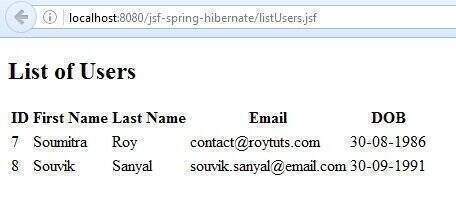
Step 18. Now run the application on Tomcat server 8 and when the application successfully deployed onto the server, please hit the URL http://localhost:8080/jsf-spring-hibernate/listUsers.jsf , you will below output in the browser
The corresponding console output
INFO: CDI @ViewScoped bean functionality unavailable
Hibernate:
    select
        this_.id as id1_0_0_,
        this_.dob as dob2_0_0_,
        this_.email as email3_0_0_,
        this_.first_name as first_na4_0_0_,
        this_.last_name as last_nam5_0_0_
    from
        user_details this_
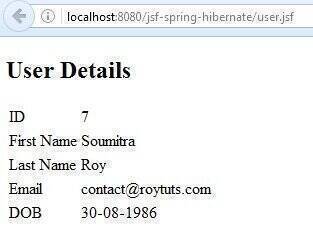
When you hit the URL http://localhost:8080/jsf-spring-hibernate/user.jsf in the browser, you will see the below output
The corresponding console output
INFO: CDI @ViewScoped bean functionality unavailable
Hibernate:
    select
        userdetail0_.id as id1_0_0_,
        userdetail0_.dob as dob2_0_0_,
        userdetail0_.email as email3_0_0_,
        userdetail0_.first_name as first_na4_0_0_,
        userdetail0_.last_name as last_nam5_0_0_
    from
        user_details userdetail0_
    where
        userdetail0_.id=?
Inside UserDetailsDaoImpl I use the following code:
@Transactional
@Override
public UserDetails getuserDetails(int id) {
UserDetails userDetails = (UserDetails) sessionFactory.getCurrentSession().get(UserDetails.class, id);
return userDetails;
but I get UserDetails is not mapped
Ok, thank you!, the code works fine